




Canvio Basics
Portable External Hard Drive
Storing your photos, videos, and data has never been easier. The Toshiba Canvio Basics offers up to 4 TB¹ of storage in a sleek, compact design that’s perfect for life on the go. Just plug it in to start saving and accessing your files—no software installation required. With lightning-fast transfer speeds and USB 3.0 connectivity, you can quickly move files while powering the drive directly through your laptop’s USB port. It’s simple, reliable storage made for everyday use.
.tmb-0.jpg?Culture=en)
Instant
Storage.
One of the easiest ways to add storage to your computer with simple plug-and-play operation. Ready to use with your PC and no software installation required. Intuitively drag and drop files to and from your laptop or PC.
Take It Anywhere.
Free Up Space
Everywhere.
Built for life on the go, the Canvio Basics features a sleek, lightweight design compact enough to fit in your pocket—making it easy to carry and store your files wherever you are. With up to 4 TB¹ of capacity, it’s perfect for offloading your growing collection of photos, music, and videos, helping you free up space on your PC’s internal storage and keep your system running smoothly.
.tmb-0.jpg?Culture=en)
and reliable performance.

Features and Benefits
Click arrows below to learn more.
.tmb-0.png?Culture=en)
.png)
Applications4
Laptop and Desktop PCs.

What's in the Box
- Toshiba Canvio Basics Portable Hard Drive
- USB 3.2 Gen 1 Cable
- Quick Start Guide
- 1-year standard limited warranty3
Where to Buy
Toshiba consumer hard drives are currently available at select retailers and distributors.
Click the button below to find your local retailers and distributors.
*Toshiba does not guarantee the availability of all products or models at retailers and distributors.
.png)
black design
.png)
file storage
.png)
.png)
warranty3
| Capacity1 | Up to 4 TB |
| Interface | USB 3.2 Gen 1 |
| Interface Transfer Rate2 | Up to 5 Gb/s (USB 3.0) Up to 480 Mb/s (USB 2.0) |
| Drive Format | NTFS |
| Size (mm) | 1 TB/2 TB: 78(W) x 109(L) x 14(H) mm 4 TB: 78(W) x 109(L) x 19.5(H) mm |
| Color | Matte Black |
| Weight (g) | 1 TB/2 TB: 149 4 TB: 217.5 |
System Requirements
- Formatted NTFS for Microsoft® Windows® 11, Windows® 10
- Requires reformatting for macOS® v15.0/ v14.7/ v13.7
- Available USB 2.0 or USB 3.0 Port

.tmb-0.png?Culture=en)
External Hard
|
.png)
|
.png)
|
|
|
.png)
|
.png)
|
| Product Series | Canvio Flex | Canvio Gaming | Canvio Advance | Canvio Advance Plus | Canvio Basic | Canvio Ready |
| Application | USB-C® Ready Cross-Device Compatibility |
Portable Game Storage | Backup & Security | USB-C® Ready Backup & Security |
Plug&Play Storage | Plug&Play Storage |
| Capacities1 | 1 TB, 2 TB, 4 TB | 1 TB, 2 TB, 4 TB | 1 TB, 2 TB, 4 TB | 2 TB, 4 TB | 1 TB, 2 TB, 4 TB | 1 TB, 2 TB, 4 TB |
| Casing | Satin Finish | Satin Finish | Textured Finish | Textured Finish | Matte Finish | Two-Tone Finish |
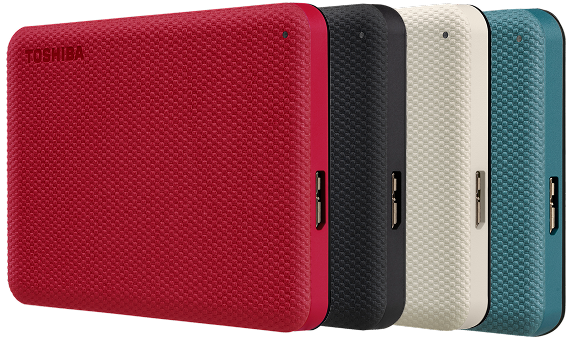
| Colors | Silver | Dark Gray | Red, White, Green, Black | Honey, White, Green | Black | Black |
| Device Connectivity | USB-C®, USB-A | USB-A | USB-A | USB-C®, USB-A | USB-A | USB-A |
| Works With4 | PC/Mac®/ Tablet/Smartphone | PC/Mac®/Game Console | PC/Mac® (reformatting required for Mac®) | PC/Mac® (reformatting required for Mac®) | PC/Mac® (reformatting required for Mac®) | PC/Mac® (reformatting required for Mac®) |
| Auto Backup Software6 (for Windows®) | - | - | ✓ | ✓ | - | ✓ |
| Password Protection Software6 (for Windows®) | - | - | ✓ | ✓ | - | - |
| Limited Warranty3 | 3 years | 2 years | 2 years | 3 years | 1 year | 1 year |
Product specifications, colors, features, software, and availability are subject to change without notice.
WARNING: This product can expose you to chemicals, including lead, known to the State of California to cause cancer and birth defects or other reproductive harm. For more information go to www.P65Warnings.ca.gov. Wash hands after handling.
Microsoft and Windows are trademarks of the Microsoft group of companies.
Mac, macOS, iPad, iPad Pro, and Time Machine are trademarks of Apple Inc., registered in the U.S. and other countries and regions.
Android and Android logo are either registered trademarks or trademarks of Google LLC.
USB Type-C® and USB-C® are registered trademarks of USB Implementers Forum.
“PlayStation”, “PlayStation 4”, “PlayStation 5”, “PS4”, and “PS5” are registered trademarks or trademarks of Sony Interactive Entertainment Inc.
“Xbox”, “Xbox One”, and “Xbox Series X|S” are registered trademarks or trademarks of Microsoft Corporation.
Canvio and the Canvio logo are trademarks or registered trademarks of Toshiba Electronic Devices & Storage Corporation in the United States and other countries.
All other trademarks are the property of their respective owners.
 Will open in a new window.


